
“We generate 200+ invoices a week from our Airtable base. What used to take a full day now happens with a single button click. Genuinely a lifesaver.”
S
Sarah K.
Operations Lead

 Airtable x PDF Maker
The PDF Maker Airtable Extension lets you generate polished PDFs directly from your base — one at a time or hundreds in bulk. No coding. No copy-paste. No leaving Airtable.
Free plan available.
Customer Orders · Grid viewCustomer | Amount | Status |
|---|---|---|
AAlex Morgan | $2,450.00 | •Ready |
SSam Chen | $980.00 | •Ready |
JJamie Ray | $1,320.00 | •Ready |
Invoice
INV-2048
Billed to
Alex Morgan
Date
May 29, 2024
Watch it work
A 2-minute walkthrough: install → template → generate. That's it.
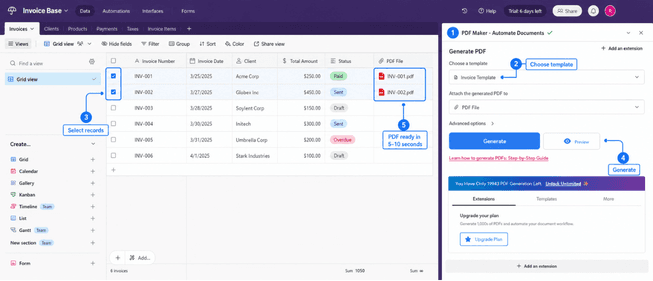
Install the PDF Maker Extension from the Airtable Marketplace, upload a Google Docs or Word template, select one or more records, and click Generate. The finished PDF appears in your record's attachment field within 5–10 seconds.
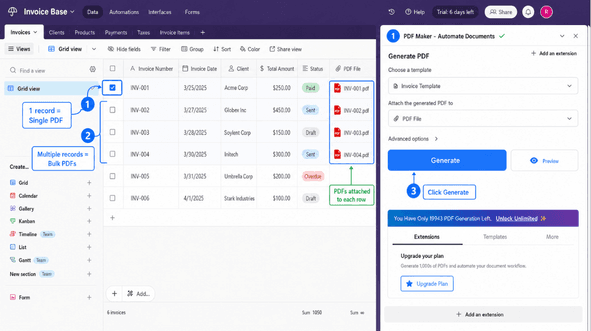
Yes. Select multiple records in your Airtable table, click Generate, and PDF Maker will produce a separate PDF for each selected record and attach them all to their respective rows — no loops or scripts needed.
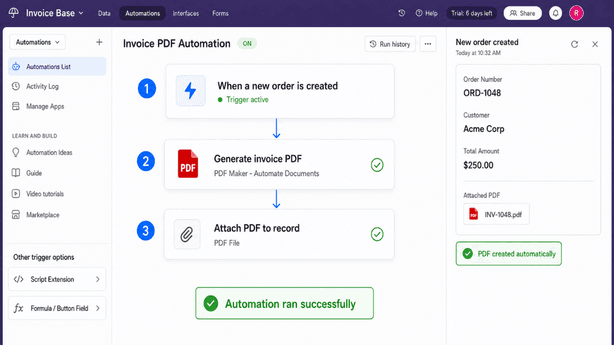
Yes. Trigger PDF generation automatically using Airtable Automations, the Airtable Script Extension, or from a Formula/Button field — for example, generate an invoice PDF the moment a new order record is created.
The entire setup takes about 5 minutes. After that, generating a PDF is a single click.
Open any Airtable base, click Extensions, search for 'PDF Maker,' and add it. Free plan works instantly — no credit card required.
Create a document in Google Docs or Word. Add placeholders like {{customer_name}} where dynamic content should appear.
Pick your template, choose an attachment field to receive the PDFs, select records, and click Generate. Done.
Step-by-step guides
Learn how to design dynamic PDF templates from Google Docs — add text placeholders, dynamic images, and line-item tables that pull data from your Airtable base.
A complete walkthrough on generating single and bulk PDFs directly from your Airtable records — including custom naming and attachment field setup.
Trusted by Airtable teams
3,000+
Airtable teams
1M+
PDFs generated
4.9★
Marketplace rating
5–10s
Per PDF, on average
“We generate 200+ invoices a week from our Airtable base. What used to take a full day now happens with a single button click. Genuinely a lifesaver.”
Sarah K.
Operations Lead
“Google Docs template support is what sold me. I didn't have to rebuild our existing invoice — just added placeholders and it worked first try.”
Marcus D.
Founder, Agency
“Set up an Airtable Automation so every new project record auto-generates a contract PDF. Zero manual work now. Set-and-forget.”
Rachel T.
Project Manager
FAQ
Install now
Install the PDF Maker Extension in your Airtable base and generate your first professional PDF in under 5 minutes. Free forever plan — no credit card required.