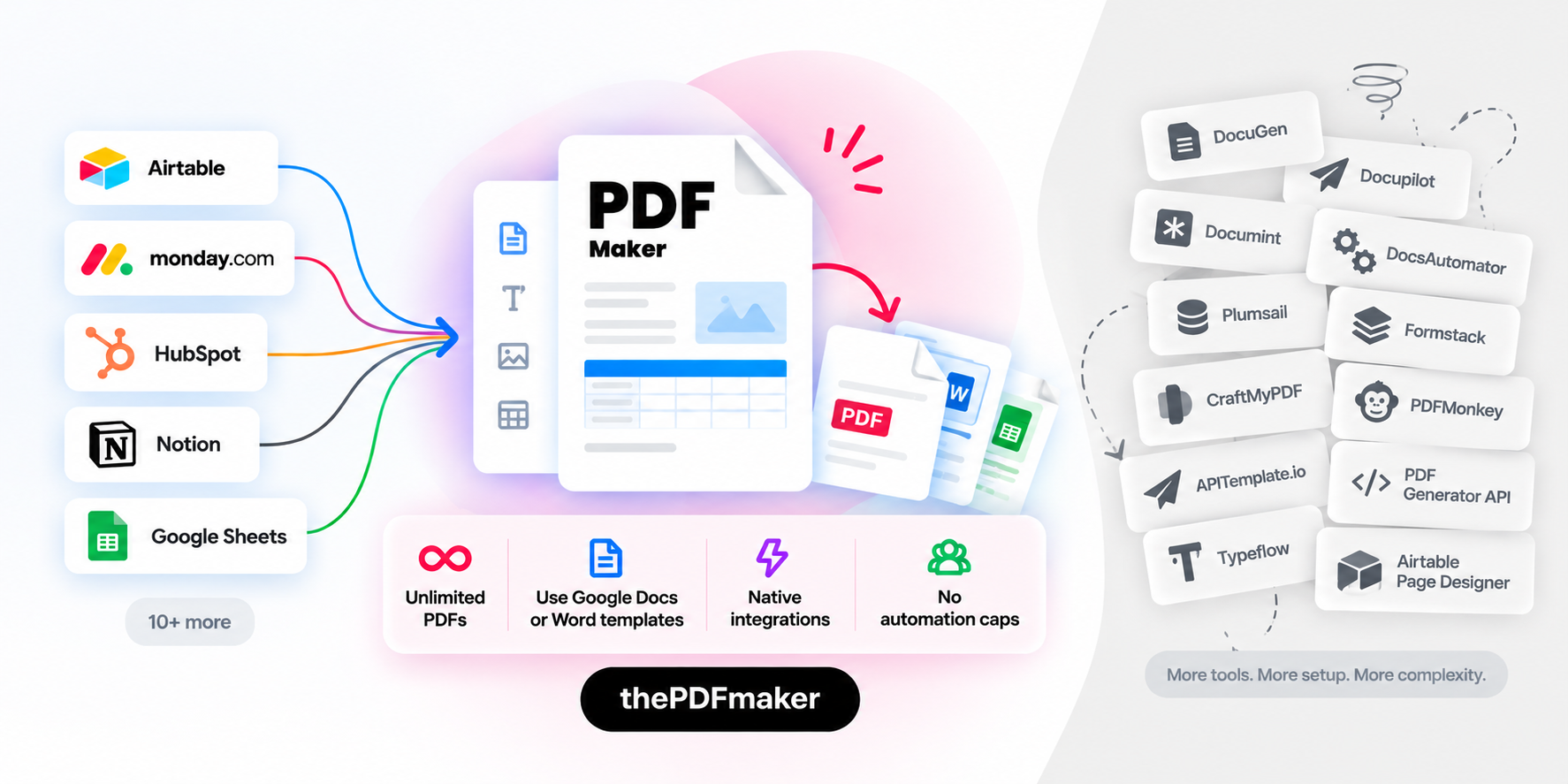
The best PDF automation software for no-code teams.
The PDF Maker generates branded PDFs from your existing data — natively from monday.com, HubSpot, Airtable, Notion, and 10+ more platforms. See how we stack up against every alternative.
20 free PDFs · No credit card · Set up in 5 minutes
Quick Answer
PDF automation software generates PDF documents from your data automatically, pulling fields from tools like Airtable, monday.com, HubSpot, Notion, or Google Sheets into pre-designed templates and outputting a branded PDF for each record. The PDF Maker leads the category for no-code teams — trusted by 5,000+ businesses with 4.8/5 Capterra rating, native integrations across 13+ platforms, unlimited PDFs from $29/month, and HIPAA/GDPR compliance. Below we compare The PDF Maker in depth against every major alternative including DocuGen, Docupilot, Documint, DocsAutomator, Plumsail Documents, Formstack, CraftMyPDF, PDFMonkey, APITemplate, PDF Generator API, Typeflow, and Airtable Page Designer.
5,000+
Businesses using PDF Maker
1M+
Documents generated monthly
85%
Time saved on documents
13+
Native integrations
Category Primer
What is PDF automation software?
A quick primer for anyone new to document automation, or comparing options for the first time.
The category in plain English
PDF automation software is a category of business tools that generate PDF documents from your data automatically. Instead of typing every invoice, contract, quote, packing slip, or certificate one at a time, you build a template once and let the tool merge in your customer or record data whenever it's needed.
Modern PDF automation tools connect to the platforms your team already works in — Airtable, monday.com, HubSpot, Notion, Google Sheets — and trigger PDF generation from events like a button click, a new deal, a completed form, or a scheduled job.
The end result: what used to take hours of manual copy-paste per week becomes a background operation that runs without anyone touching it.
1
Design your template
Use Google Docs or Word with placeholder tags for dynamic content
2
Connect your data
Airtable, monday.com, HubSpot, Notion, Sheets, or API — natively
3
Trigger & deliver
Button click, automation, or API — attach, email, sign, save automatically
In-Depth Comparisons
Compare The PDF Maker to every alternative
12 detailed side-by-side comparisons, grouped by what each tool does best. Each page has full pricing math, honest concessions, an interactive preview, and a migration path.
Airtable-focused
Alternatives for Airtable users
Tools built primarily for teams whose data lives in Airtable. If you're outgrowing Page Designer or need multi-platform support, start here.
Tools that work across multiple data sources — CRMs, project management tools, spreadsheets, and forms. Best for teams whose data doesn't live in just one place.
REST APIs designed for embedding PDF generation into your own product or app. Great if you have developer resources; overkill if your team is non-technical.
Three things that consistently show up in every side-by-side comparison.
13+ native integrations
Certified monday.com app, native HubSpot, Airtable, Notion, Google Sheets, Forms, Pipedrive, Zoho CRM, LeadConnector, plus Zapier, Make, N8N, and REST API.
Unlimited PDFs — no counting
Paid plans include unlimited PDF generation with no per-document caps, no overage fees, no credits to buy, and no automation limits. From $29/mo.
HIPAA & GDPR compliant
Enterprise-grade compliance with BAA available for healthcare. TLS 1.3 in transit, AES-256 at rest. Trusted by teams in healthcare, legal, and finance.
How to Choose
How to pick the right PDF automation tool
Four questions that eliminate most options quickly. The answer to each usually narrows the field to two or three real candidates.
1
Where does your data live?
The single biggest factor. If your data is entirely in Airtable, look at Airtable-native tools (Documint, DocsAutomator, Typeflow, or PDF Maker). Living in monday.com? DocuGen or PDF Maker. HubSpot-first? Docupilot or PDF Maker. Microsoft 365 shop? Plumsail. Data in multiple platforms? Only PDF Maker and Docupilot cover the range.
2
How many PDFs per month?
Under 50 PDFs? Any free tier works. 100-500? Watch per-doc pricing — DocsAutomator, DocuGen, Documint charge per document. 500+ docs? Unlimited-plan tools like PDF Maker ($29) win decisively. 5,000+? You need enterprise APIs or unlimited plans; per-doc tools get expensive fast.
3
Do you have developers?
No developers on the team? Skip developer APIs (PDFMonkey, PDF Generator API, APITemplate, CraftMyPDF). They're excellent tools, but marketing, sales, and ops teams find no-code tools much faster to onboard. Have developers and want to embed PDF generation? PDF Generator API's embeddable editor is unique.
4
What's your compliance requirement?
Healthcare, finance, legal, or government? Check for HIPAA and BAA, GDPR, SOC 2, and where data is stored. PDF Maker offers HIPAA and GDPR. Plumsail and PDF Generator API offer on-premise. CraftMyPDF is SOC 2 certified. Verify before committing.
What Teams Say
Teams who chose PDF Maker after comparing
★★★★★
"Evaluated eight PDF tools before landing here. PDF Maker was the only one that natively connected to both our HubSpot CRM and our Airtable ops board without Zapier bridges. Setup took an afternoon."
MAMarcus A.Head of RevOps, B2B SaaS
★★★★★
"We ran ~3,000 invoices/mo through DocsAutomator and were stacking $200+ in monthly overages. Switched to PDF Maker at $29 flat. Same Google Docs templates. No more overages, no more counting."
RPRenata P.Finance Ops, e-commerce brand
★★★★★
"HIPAA compliance ruled out half the market immediately. PDF Maker was the only Airtable-native tool that gave us a BAA. Our practice manager sets up new templates without any IT involvement."
CVDr. Cassia V.Founder, mental health practice
Common Questions
Frequently asked questions
What is PDF automation software?
PDF automation software generates PDF documents from your data automatically — pulling fields from tools like Airtable, monday.com, HubSpot, Notion, or Google Sheets into pre-designed templates (usually Google Docs or Word) and outputting a branded PDF for each record. Instead of manually filling out invoices, contracts, quotes, or reports one at a time, PDF automation tools let you trigger generation via a button click, a workflow event, an API call, or a batch job across an entire view.
What is the best PDF automation software in 2026?
The best PDF automation software depends on your primary data source. The PDF Maker leads for no-code teams needing native integrations across multiple platforms — it's a certified monday.com app and offers native HubSpot, Airtable, Notion, Google Sheets, and 10+ more integrations at $29/month for unlimited PDFs. Documint and DocsAutomator are strong for Airtable-only workflows. PDFMonkey, PDF Generator API, and APITemplate.io are built for developers. Plumsail Documents suits enterprise Microsoft 365 shops.
How does PDF automation software work?
You build a template once (usually in Google Docs or Microsoft Word) with placeholder tags where dynamic content should appear — customer name, invoice line items, dates, prices. When a trigger fires (a button click in Airtable, a new deal in HubSpot, an API call from your app), the automation tool pulls the matching data from your source, merges it into the template, renders a PDF, and delivers it — attaching to the record, emailing to the recipient, saving to Google Drive, or sending to an e-signature tool like DocuSign.
What are the top PDF automation alternatives in 2026?
The 12 leading PDF automation alternatives to evaluate in 2026 are: DocuGen, Docupilot, Documint, DocsAutomator, Plumsail Documents, Formstack Documents, CraftMyPDF, PDFMonkey, APITemplate.io, PDF Generator API, Typeflow, and Airtable Page Designer. We compare The PDF Maker against each in detail — see the grouped alternatives list above.
How much does PDF automation software cost?
Entry tiers typically start at $19-29/month for around 100 documents. Mid-tier plans for 1,000-5,000 monthly documents range from $59-149/month. Enterprise developer APIs like PDF Generator API and Plumsail can run $200-800+/month. Most tools charge overage fees ($0.05-$0.20/extra document) once you exceed a plan's cap. The PDF Maker offers unlimited PDFs starting at $29/month with no overage fees.
What integrations should PDF automation software have?
Native (first-party, no Zapier bridge) integrations to look for depend on your stack. The most in-demand data sources are: Airtable, monday.com, HubSpot CRM, Notion, Google Sheets and Forms, and workflow tools like Zapier and Make. Delivery/e-signature integrations that matter: DocuSign, Adobe Sign, Google Drive, Dropbox, and Slack. The PDF Maker provides 13+ native integrations.
Do I need PDF automation software or a PDF API?
If your team is non-technical and works in tools like Airtable, monday.com, HubSpot, or Notion, choose PDF automation software with native no-code integrations. If you have developer resources and want to embed PDF generation into your own product, choose a developer API (PDFMonkey, PDF Generator API, APITemplate.io, CraftMyPDF). The PDF Maker offers both a REST API alongside no-code integrations.
Can I try PDF Maker for free before paying?
Yes. The PDF Maker offers 20 free PDFs per month, no credit card required. DocsAutomator, Documint, PDFMonkey, and CraftMyPDF offer free tiers (10-50 PDFs/month). Docupilot, Plumsail, APITemplate, and PDF Generator API typically offer 7-14 day free trials with credit card required. Airtable Page Designer is included with your Airtable plan.
Is PDF Maker HIPAA and GDPR compliant?
Yes. The PDF Maker is HIPAA-compliant (with BAA available for healthcare organizations on qualifying plans) and GDPR-compliant. Data is encrypted in transit (TLS 1.3) and at rest (AES-256). Not every PDF automation alternative meets both standards — verify compliance requirements against your specific industry before choosing.
Which alternatives support Airtable natively?
Six alternatives support Airtable natively: The PDF Maker, DocsAutomator, Documint, Typeflow, Docupilot (limited), and Airtable Page Designer (built-in extension). The PDF Maker offers Airtable plus 12 other native integrations. DocsAutomator, Documint, and Typeflow are Airtable-focused. Page Designer is free with Airtable but limited to single-page, single-record, no-automation workflows.
Ready to stop clicking
Try it with your real data.
Take one document you currently generate manually — an invoice, a proposal, a contract. Rebuild it in The PDF Maker with your actual records. Generate a real PDF. Twenty of them, free, with no credit card.